A Usb C Bulkhead Connector may look like a small panel fitting, but it carries several design decisions. The wrong choice can leave a loose port, a strained cable, or a connection that fails in a wet or dusty setting. “A connector is only as dependable as its weakest interface,” says connector design engineer Lena Ortiz. Use that idea as a starting point, not a substitute for checking the product’s specifications.
This guide’s seven tips focus on details you can verify: panel thickness, cutout dimensions, mounting method, sealing, cable strain relief, and the USB-C functions you actually need. A port intended only for charging may not support the data rate or power delivery your equipment requires. Check the manufacturer’s ratings and drawings; do not infer performance from a familiar-looking socket. Small things matter. A gasket can be pinched. A nut can loosen under vibration. We should admit that even careful selection cannot compensate for poor installation, and product pages sometimes leave key details unclear.
Before ordering, compare the connector’s stated capabilities with the host device, cable, enclosure, and operating environment. Look for explicit information on data, charging, and environmental protection, then confirm dimensions against the panel itself. If the details are missing, ask the supplier rather than guessing. The sections ahead offer a practical checklist for choosing a Usb C Bulkhead Connector that fits the panel and the job, while leaving room to reconsider when the specifications do not add up.
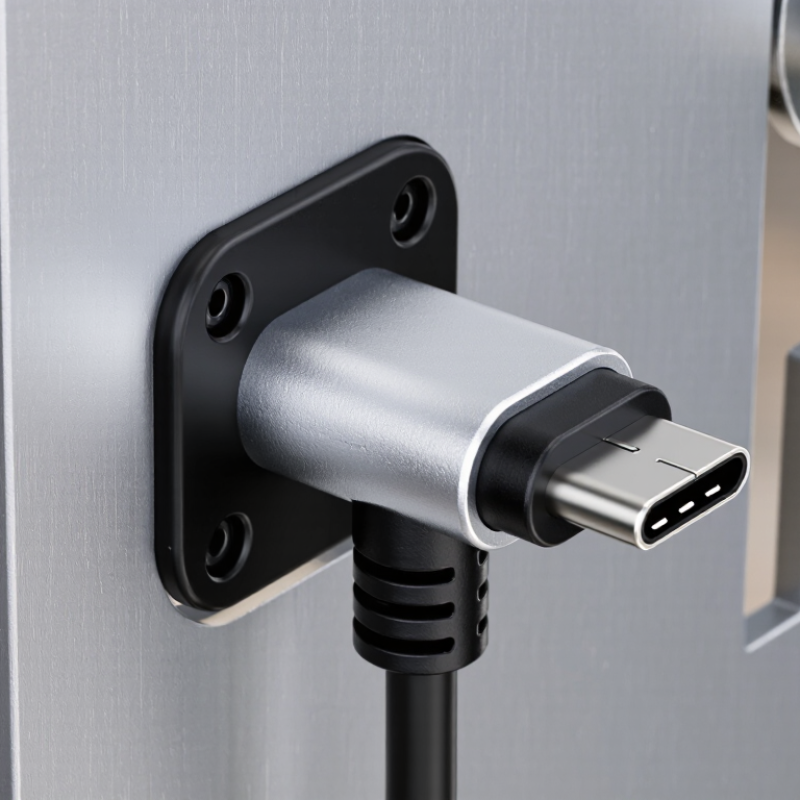
Before selecting a USB-C bulkhead connector, define what it must do in the finished equipment. Will it carry data, charging power, or both? Check the required data rate and power level against the connector and cable specifications. A charging port may work well for a handheld control panel, while a data-heavy instrument needs verified signal performance. Avoid assuming every USB-C connection supports the same functions.
Write down the installation conditions, too. Measure panel thickness, cutout dimensions, and the space behind the panel. Check how the cable exits and whether it can bend without pressing against a cover or nearby component. Small details matter. For outdoor or washdown equipment, identify the needed ingress protection and confirm that the rating applies to the assembled installation, not just one component. Vibration, temperature, and repeated plugging can also affect the choice. A practical fit check with the actual panel and cable can catch problems early. It may feel overly cautious, but reworking a sealed enclosure is rarely simple. Leave enough access for fastening and inspection; crowded layouts are easy to underestimate on a drawing.

A USB-C bulkhead connector is only the panel interface; its shape does not guarantee a particular data rate or charging level. USB-IF’s USB Power Delivery 3.1 specification supports power profiles up to 240 W, while USB4 Version 2.0 supports data rates up to 80 Gbps. These are system capabilities, not promises made by every connector or cable. Check the host, cable, and bulkhead specifications together before selecting a configuration.
Tip: Match the data path to the task. For keyboard control or basic serial data, a lower-speed configuration may be sufficient. For large file transfers or video, verify the connector’s supported protocol and signal integrity. Need charging too? Confirm the required voltage, current, and power-delivery support. A USB-C opening alone proves none of these.
Check the panel thickness, mounting method, and cable clearance as carefully as the electrical ratings. A short internal cable can simplify installation, but it may limit performance or service access. For outdoor or washdown equipment, review the stated ingress protection rating for the complete assembly; the connector alone may not provide a sealed panel. It is easy to overlook that detail. Cite the supplier’s test conditions and allow room behind the panel for strain relief and a gentle cable bend.
Tip 1: Check the panel dimensions before selecting a USB-C bulkhead connector. Measure the cutout’s width, height, and corner radius with calipers; a drawing may show nominal dimensions, not your actual panel. Measure twice. Also check the panel thickness against the connector’s clamping range. A connector that is too short may not secure properly, while excess thread can interfere with nearby parts.
Tip 2: Inspect the mounting method and available clearance. A threaded barrel with a locknut is common, but confirm there is room behind the panel for the nut, cable, and plug. Keep the connector aligned with the opening, and avoid overtightening, which can distort thin panels or damage seals. Small gaps matter. If the panel is curved or uneven, test the fit before final assembly.
Tip 3: Match environmental sealing to the installation. Check whether the stated protection rating applies to the connector alone or to the fully assembled interface, including the panel seal and mating plug. Dust or moisture can enter through a poorly compressed gasket. Clean the sealing surface, seat the gasket flat, and follow the specified torque. Ratings depend on correct installation, so verify them in the product documentation. A quick splash test may reveal a problem, but it does not confirm a formal protection rating.
7 Tips for Choosing a USB C Bulkhead Connector
Tip 1: Check the shell and contact materials against the installation environment. Stainless steel can suit exposed panels, while a plated metal shell may work well indoors. Look for corrosion-resistant contacts and a clearly specified temperature range. Tip 2: Inspect the seal, thread, and panel fit. A gasket needs even pressure around the opening; a loose fit can let dust or moisture pass. “Water-resistant” does not mean suitable for every wet setting.
Tip 3: Match the connector to the cable’s outer diameter and construction. A thick, braided cable may not fit a narrow rear opening. Check the connector’s cable range, strain relief, and space behind the panel before ordering. Small details matter.
Tip 4: Confirm the required data and power performance in the specifications. A USB-C shape alone does not guarantee a particular transfer rate or charging capability. Check that the connector, cable, and connected equipment all support your needs. Tip 5: Consider repeated connection and cable movement. A sturdy coupling and solid mounting can reduce wobble, but sharp bends near the connector still stress the cable.
Tip 6: Review the installation details, including panel thickness and cutout dimensions. Measure twice; a slightly oversized hole can make a secure seal difficult. Tip 7: If the application is demanding, test a sample with the actual cable and enclosure. Specifications help, but real fit can surprise you. I might overlook clearance on a drawing, too.
| Tip | What to Assess | Practical Checks | Why It Matters |
|---|---|---|---|
| 1 | Match the connector to the required USB-C functions. | Confirm supported data rates, USB Power Delivery capability, and whether the assembly supports the required USB-C operating modes. Check the product specification rather than relying on the connector shape. | USB-C describes the connector format; it does not, by itself, guarantee a particular data rate, power level, or feature set. |
| 2 | Choose materials suited to the installation environment. | Review the shell, contacts, plating, insulators, and any seals. Consider exposure to moisture, salt, cleaning agents, vibration, and temperature changes. | Material and finish affect corrosion resistance, electrical contact quality, and long-term performance. Suitability depends on the full assembly and its environment. |
| 3 | Check the stated mating durability. | Look for a specified mating-cycle rating and confirm the test conditions. Compare it with how often the connector will be plugged and unplugged. | Mating-cycle life is design-specific. A connector’s appearance or material alone does not establish its durability rating. |
| 4 | Verify panel fit and mounting requirements. | Use the manufacturer’s mechanical drawing to check the panel cutout, mounting method, panel-thickness range, connector orientation, and clearance behind the panel. | Bulkhead designs vary, so a nominal connector type does not guarantee compatible cutout dimensions or adequate installation clearance. |
| 5 | Match the cable to the required data and power performance. | Check the cable’s rated data capability and current or power rating, along with length and connector type. For higher USB Power Delivery levels, verify that the cable is explicitly rated for the intended use. | A USB-C cable’s capabilities are not determined by its plug shape. The cable and bulkhead assembly can limit the performance of the complete link. |
| 6 | Assess sealing and environmental protection. | If an ingress-protection rating is required, confirm the stated rating and test conditions. Check whether it applies when the connector is mated, unmated, or used with a specified cap or seal. | IP ratings are condition-dependent. A rating for one configuration should not be assumed to apply to every installation or mating state. |
| 7 | Review shielding, grounding, and installation details. | Check how the connector shell bonds to the panel, how cable shielding is handled, and whether the installation instructions specify grounding or fastening requirements. | Correct bonding and assembly help maintain a reliable connection and support the intended electromagnetic compatibility performance of the equipment. |
Tip: Verify the standards. Match the connector’s USB-C configuration, rated current, data capability, and environmental protection to your design. Check which standards and test methods apply, and confirm their current revisions. A connector’s rating may not describe the performance of the complete assembly. Panel thickness and cable clearance matter, too. Small details, big consequences.
Tip: Ask for test evidence. Request reports or clear test summaries for the exact connector configuration, not just a similar product. Look for insertion and withdrawal cycle results, temperature limits, and ingress testing when moisture or dust is a concern. Test a sample in your own enclosure. A tightly fitted seal can still fail when the panel surface is uneven. I would not assume a catalog figure proves your setup is ready.
Tip: Check supplier support before ordering. Ask for dimensioned drawings, material details, traceability information, and notice of design changes. Confirm how technical questions and replacement requests are handled. A responsive supplier can help resolve fit or specification gaps early. Keep the record. Support promises sound reassuring, but written details are easier to verify later.
© Shipham Valves 2025. All Rights Reserved.
Website By PS Website Design Ltd
Request a Quote/Further Information
Download
We use cookies on this website, by continuing to browse the site you are agreeing to our use of cookies. Find out more.